YouTube Rolls Out Free Picture-in-Picture Mode for Global Users
The floating window feature arrives for all users, enhancing mobile multitasking without a paid subscription.
The free Picture-in-Picture (PiP) mode on YouTube is now a reality for millions of users worldwide. Google has initiated the rollout of this highly anticipated feature, allowing viewers to watch videos in a small, floating window while navigating other applications on their mobile devices. For years, this functionality was restricted to users with a paid membership, but this change marks a significant shift in how the platform balances user experience, accessibility, and Premium monetization.
Understanding the Picture-in-Picture (PiP) Experience
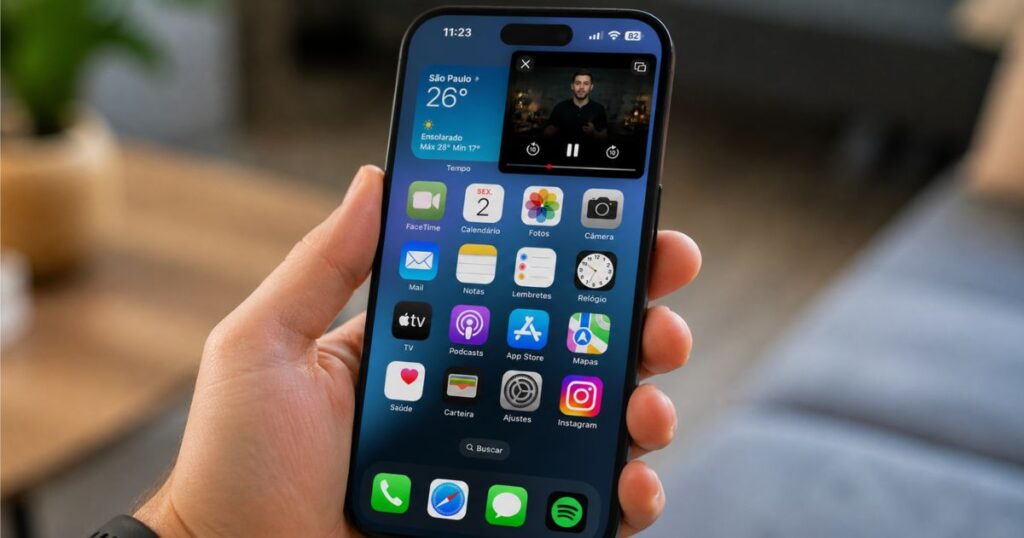
The Picture-in-Picture (PiP) mode is an accessibility and multitasking feature that allows a video playback window to remain visible even when you exit the primary application. Instead of pausing the video or requiring the user to stay on the YouTube app, the video shrinks into a small, resizable window that can be dragged and repositioned across the screen.
This functionality completely transforms the mobile viewing and listening experience, particularly for multitaskers who consume long-form content, podcasts, or educational tutorials. Users can now follow along with a recipe, watch a tech review, or enjoy an educational video while simultaneously responding to text messages, checking emails, or scrolling through social media feeds.
Historically, this feature was limited exclusively to YouTube Premium subscribers, or restricted to users in specific regions such as the United States on Android devices. By opening up the feature globally, the platform aligns itself with other modern video and streaming applications that have offered this level of multitasking convenience for quite some time.
What Changed with the Free Release
While the release of the free PiP mode has been met with enthusiasm, there are certain limitations that users must be aware of. The free version of the feature is generally intended for non-music content, meaning it functions properly on general videos, educational content, gaming vlogs, and entertainment channels.
On the other hand, music videos and audio-only content streams remain restricted under the free tier. If a user attempts to use PiP on a copyrighted music video, the playback pauses automatically. This protective design ensures that YouTube Music maintains its exclusive background and PiP playback benefits, preserving the subscription value proposition for the music streaming side of the platform.
Additionally, free users will still encounter advertisements during the PiP experience. Those who subscribe to the Premium tier continue to enjoy distinct, exclusive advantages, such as uninterrupted ad-free playback, continuous background audio when the screen is locked, and full access to PiP across all content categories, including music.
How to Enable PiP Mode on Your Mobile Device
Enabling the feature is generally straightforward, though it may require minor adjustments within both the device’s system settings and the YouTube application itself. Because the feature is being rolled out gradually by Google, it may take some time before it becomes available to all users across different regions and device models.
On iPhone (iOS)
Open the device “Settings” app.
Navigate to the “General” tab.
Tap on the “Picture-in-Picture” option.
Toggle the switch to automatically enable the feature.
Open the YouTube application and go to your profile or settings.
Navigate to “General” and ensure that the “Picture-in-Picture” setting is turned on.
On Android
Open your device’s main “Settings” menu.
Select the “Apps” or “Applications” section.
Find and select the YouTube app from the list.
Look for the “Picture-in-Picture” (or “PiP”) permission and ensure it is granted.
Open the YouTube app, go to Settings -> General, and verify that the PiP setting is toggled on.
Google’s Strategy Behind the Change
The strategic decision by Google to offer free Picture-in-Picture mode is driven by a broader effort to increase user engagement and platform retention. As mobile multitasking becomes increasingly standard, users expect their devices and apps to support flexible viewing options.
By making the feature more widely accessible, YouTube improves the overall user experience and reduces the likelihood of users abandoning the platform to use third-party tools or alternative video platforms that offer similar multitasking capabilities. At the same time, maintaining specific restrictions for music content and ad delivery allows Google to protect the value of its Premium subscriptions, ensuring that monetization models remain robust.
This thoughtful approach helps Google strike a balance between expanding the free user base, enhancing accessibility, and encouraging users to upgrade to premium tiers for advanced capabilities.
Advantages of Free PiP
True Multitasking: Watch videos while texting, browsing the web, or using other apps.
Enhanced Accessibility: Keep track of educational or informative videos without keeping the app open full-screen.
No Paid Subscription Required: Available to standard, non-paying users for general video categories.
Simple Integration: Easily toggled on or off from the system and app settings.
User Freedom: Provides greater flexibility and convenience for daily smartphone use.
The release of free PiP mode marks an important evolution in the way users interact with YouTube on mobile devices. Even with certain limitations regarding music and ad placement, the feature significantly improves the utility and accessibility of the platform. As consumers increasingly demand more flexibility, this move aligns YouTube with modern user expectations and makes daily multitasking much easier.
Would you use PiP mode in your daily routine, or do you still prefer to watch videos in full screen?